Understanding the Importance of a Cover Letter
A well-crafted cover letter is your first impression, a chance to showcase your personality, and demonstrate your genuine interest in a specific role. It complements your resume, providing context and depth that a list of skills and experiences simply cannot convey. Many job seekers underestimate its importance, but a strong cover letter can significantly increase your chances of getting an interview. It’s your opportunity to make a connection with the hiring manager before they even look at your resume, setting the stage for a positive first impression. Ignoring this crucial document is a missed opportunity and can cost you a chance at the job.
What is the Purpose of a Cover Letter?
The primary purpose of a cover letter is to introduce yourself and highlight why you are a suitable candidate for the position. It allows you to connect your skills and experiences directly to the job requirements. The purpose is also to express your enthusiasm for the role and the company, showcasing that you are not just applying for any job, but that you have a genuine interest in this specific opportunity. A cover letter also gives you space to elaborate on your resume, providing more details and context to your experiences.
Why is a Cover Letter Necessary?

A cover letter is necessary because it’s a way to personalize your application, making it stand out from the crowd. It helps you to directly address the hiring manager, demonstrate your understanding of the company’s needs, and explain how you can solve their problems. In competitive job markets, a cover letter can be the deciding factor that elevates your application above the rest. Without one, you risk appearing impersonal and lacking the initiative to go the extra mile.
Key Components of a Cover Letter
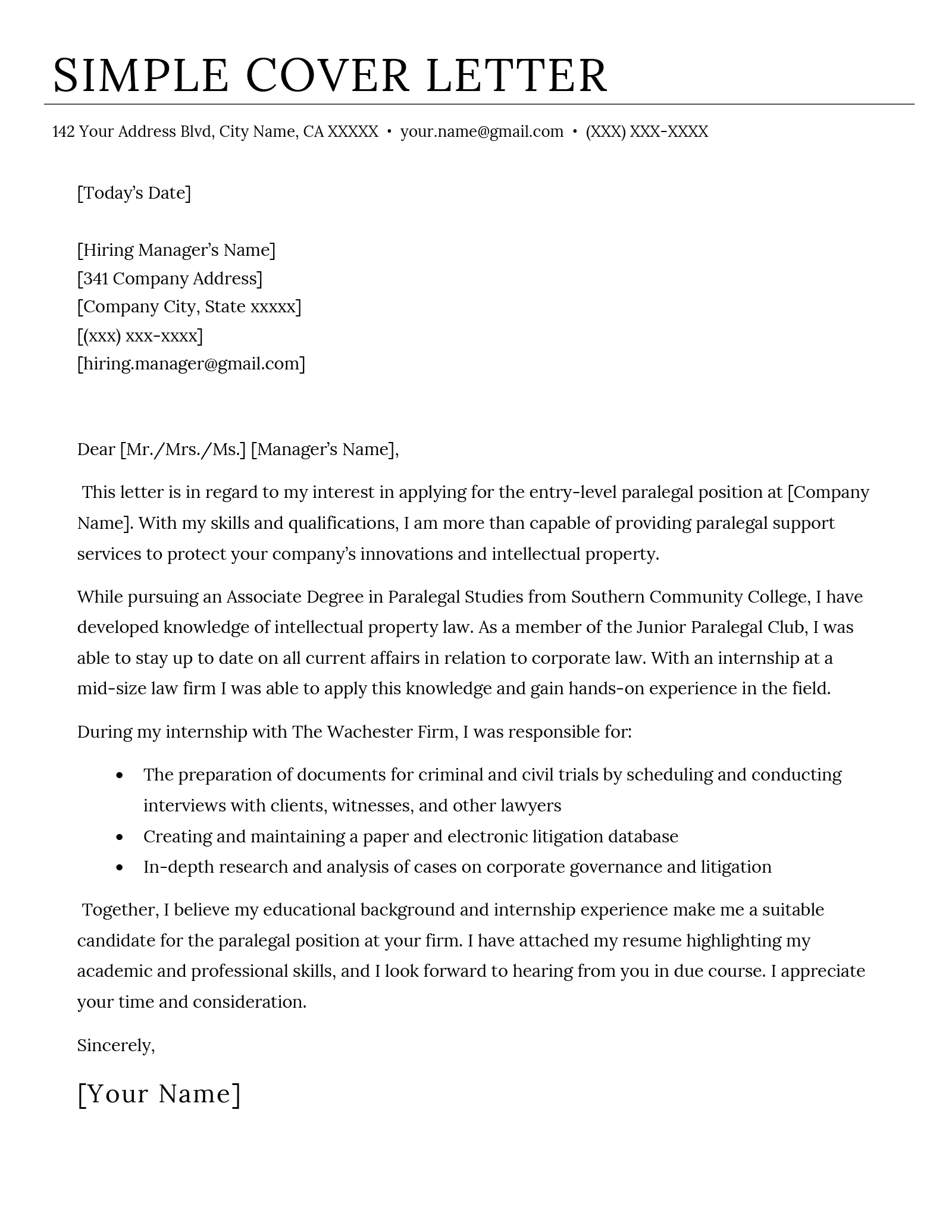
A well-structured cover letter follows a specific format and contains essential components that work together to create a compelling narrative. These include your contact information, date, recipient details, salutation, body paragraphs, closing, and signature. Each section plays a crucial role in conveying your professionalism and showcasing your suitability for the role. Neglecting any one of these can weaken the overall impact and reduce your chances of getting noticed.
Your Contact Information
At the top of your cover letter, include your name, address, phone number, and email address. This information makes it easy for the hiring manager to contact you. Make sure your email address is professional; avoid using nicknames or informal addresses. Ensure the information is current, so you don’t miss out on any potential opportunities.
Date and Recipient Information

Below your contact information, include the date and the recipient’s details. If you know the name of the hiring manager, address the letter to them directly; this personalizes your application. If you don’t have a specific name, research the company website or LinkedIn. Always include the company name and address to give the hiring manager all the necessary details.
The Salutation
The salutation sets the tone for your letter. Using ‘Dear Mr./Ms./Mx. [Last Name]’ is the most professional option. If you don’t know the hiring manager’s name, use a generic salutation like ‘Dear Hiring Manager.’ Avoid generic greetings like ‘To Whom It May Concern,’ which can make your application feel impersonal. Always double-check the spelling of the recipient’s name.
Body Paragraph 1
This paragraph introduces you and states the position you’re applying for. Briefly mention where you saw the job posting (e.g., LinkedIn, company website). Immediately grab the reader’s attention by stating your key qualifications or your most relevant experience. Your opening should be concise, clear, and immediately demonstrate your interest in the role.
Body Paragraph 2

Use this paragraph to discuss your relevant skills and experiences in detail. Align your skills with the job requirements, providing specific examples to demonstrate your accomplishments and how you’ve made an impact in previous roles. Quantify your achievements whenever possible. This is where you show the hiring manager what you can bring to the table.
Highlighting Skills and Achievements
Focus on demonstrating your skills and achievements relevant to the job description. Provide concrete examples to support your claims. Use the STAR method (Situation, Task, Action, Result) to explain how you handled a specific situation, the task you were assigned, the action you took, and the positive result of your actions. Quantify your results whenever possible using numbers, percentages, or dollar amounts to show the impact of your work.
Expressing Enthusiasm and Fit
Demonstrate your enthusiasm for the company and the role. Explain why you’re excited about the opportunity and what specifically attracts you to the company’s mission or values. Show that you’ve researched the company and understand its goals. Demonstrate how your values align with the company’s, and how you see yourself contributing to their success.
The Closing Paragraph

In your closing paragraph, reiterate your interest in the role and express your eagerness to discuss your qualifications further in an interview. Thank the hiring manager for their time and consideration. Be confident and assertive, but avoid sounding demanding. This is your final chance to make a positive impression.
The Complimentary Close and Signature
Use a professional closing like ‘Sincerely’ or ‘Best regards.’ Leave space for your signature if submitting a hard copy, and type your full name below. If submitting electronically, you can simply type your name. Ensure this section is concise and conveys a professional tone, reinforcing the positive impression you’ve worked so hard to build.
Formatting Your Cover Letter
The formatting of your cover letter impacts readability and professionalism. Choose a clean, easy-to-read font, and maintain consistent margins and spacing throughout. A well-formatted letter is easier for the hiring manager to read, making your content more impactful.
Font and Font Size

Use a professional font like Times New Roman, Arial, or Calibri. Choose a font size between 10 and 12 points for readability. Keep the font consistent throughout the letter. Avoid using overly decorative or unusual fonts that might distract the reader.
Margins and Spacing
Set margins to one inch on all sides. Use single-space within paragraphs and double-space between paragraphs. This creates a clean and organized layout, making your cover letter easier to read and visually appealing. Proper spacing ensures that the hiring manager can easily follow your train of thought.
Length of a Cover Letter
Keep your cover letter concise; aim for a single page. The content should be focused and relevant, highlighting your most important skills and experiences. Longer cover letters risk losing the reader’s attention, so prioritize clarity and conciseness.
Essential Tips for Writing a Cover Letter
To create a standout cover letter, tailor it to each job application, proofread carefully, and use action verbs to showcase your achievements. These tips help you to create a compelling document that captures the hiring manager’s attention and increases your chances of success.
Tailoring Your Cover Letter to the Job
Customize your cover letter for each job application. Carefully review the job description and identify the key skills and qualifications the employer is seeking. Highlight the relevant experiences and skills you possess that match their needs. This shows that you’ve taken the time to understand the specific requirements of the role and increases your relevance.
Proofreading and Editing
Proofread your cover letter carefully to eliminate any grammatical errors, spelling mistakes, or typos. A polished cover letter demonstrates professionalism and attention to detail. Use grammar and spell-check tools, and ideally, have someone else review your letter for a fresh perspective.
Using Action Verbs
Use strong action verbs to describe your accomplishments and responsibilities. Verbs such as ‘managed,’ ’led,’ ‘developed,’ ‘achieved,’ and ‘implemented’ make your descriptions more impactful and engaging. They showcase your accomplishments and demonstrate your ability to take initiative and get results.
Avoiding Common Mistakes
Avoiding common mistakes will ensure your cover letter makes a positive impression. Errors in grammar, generic language, and failure to follow instructions can all undermine your chances. Be mindful of these potential pitfalls to improve your application.
Grammatical Errors
Incorrect grammar and spelling errors can undermine your credibility. Always proofread your cover letter carefully, and use grammar and spell-check tools. Errors reflect poorly on your attention to detail and professionalism.
Generic Language
Avoid using generic language that could apply to any job. Tailor your letter to the specific job and company, highlighting relevant skills and experiences. Generic language shows a lack of effort and may cause the hiring manager to think you’re sending the same letter to multiple companies.
Ignoring the Instructions
Always read and follow the instructions provided in the job posting. Failure to do so can result in your application being rejected. If the job posting asks for a specific file format or asks you to address certain points, make sure you comply with those requirements.
Finalizing and Submitting Your Cover Letter
Before submitting your cover letter, double-check the file format and the method of submission. A polished and well-formatted application reflects your professionalism and increases your chances of securing an interview.
File Format
Unless specified otherwise, save your cover letter as a PDF file to preserve the formatting. This ensures that your letter looks the same on any device. Make sure your file name is clear and professional (e.g., ‘Your Name_CoverLetter’).
Submitting Online or by Email
Follow the instructions provided in the job posting for submitting your cover letter. If submitting by email, include a professional subject line. Attach the cover letter and your resume. Always double-check that you have attached the correct files before sending your email.