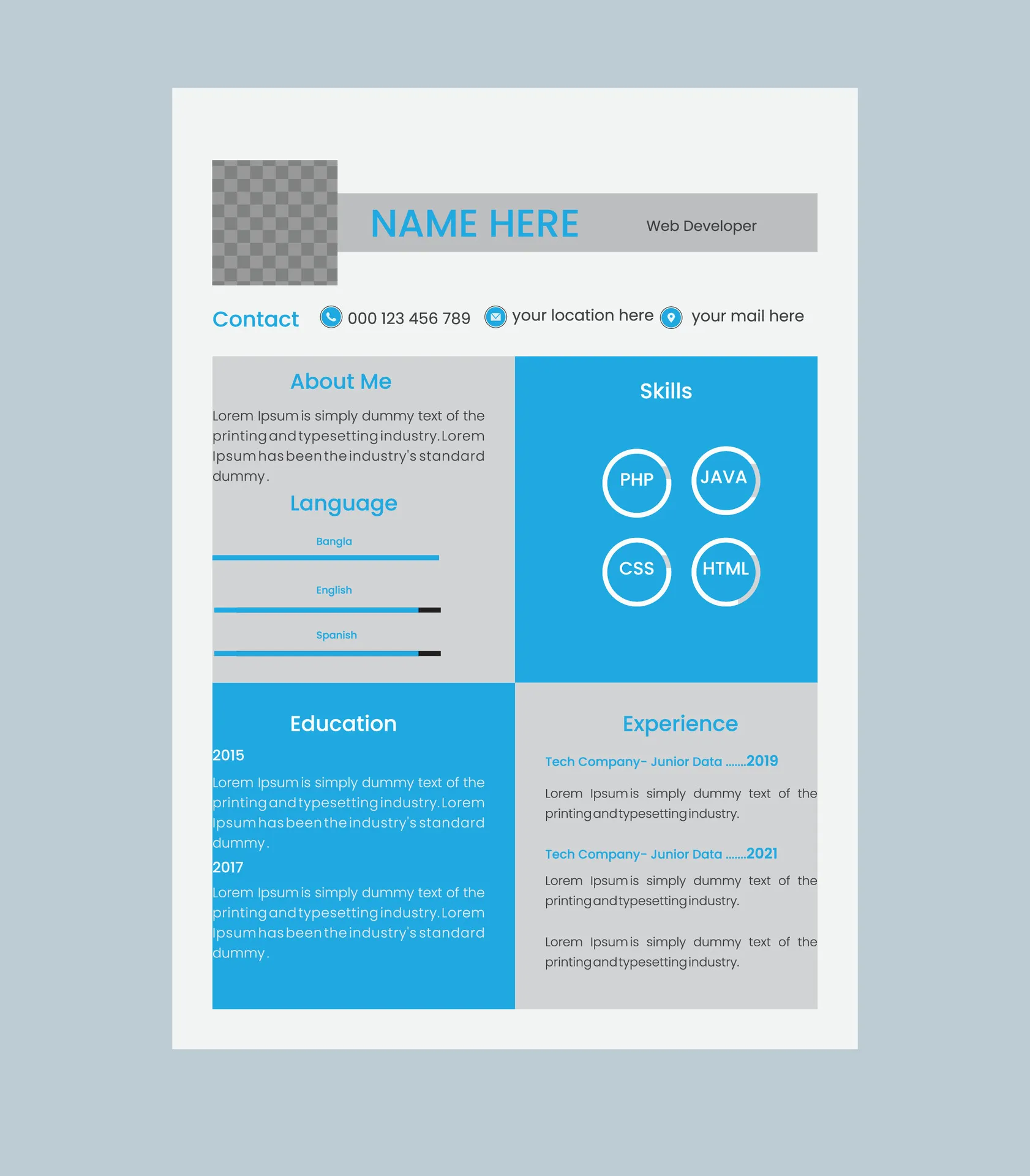
What is Resume Layout?
Resume layout refers to the visual organization and presentation of your resume’s content. It encompasses the structure, formatting, and design choices you make to present your skills, experience, and qualifications to potential employers. A well-designed resume layout is crucial for making a positive first impression, ensuring your information is easy to read, and highlighting your key strengths. This guide will help you understand the various aspects of resume layout and how to create a document that effectively showcases your professional profile. Proper resume layout helps recruiters easily find the information they need, increasing your chances of getting an interview. Remember that the goal is to present your qualifications clearly and concisely.
Why is Resume Layout Important?
The layout of your resume is paramount for several reasons. Firstly, it impacts readability. A cluttered or poorly formatted resume can be difficult to scan, causing recruiters to miss crucial information. Secondly, a clean and professional layout demonstrates attention to detail, a quality highly valued by employers. Thirdly, the layout plays a role in Applicant Tracking Systems (ATS). Many companies use ATS to screen resumes, and a layout that is not ATS-friendly can result in your resume being rejected before a human even sees it. Fourthly, a well-structured resume layout quickly highlights your key skills and experiences, allowing hiring managers to understand your value proposition swiftly. Finally, a well-designed resume layout will make you stand out.
Key Elements of Effective Resume Layout

Several elements contribute to an effective resume layout. These elements work together to create a visually appealing and informative document. Consider your target audience and the specific jobs for which you are applying. Ensure that your layout aligns with the expectations of the industry. Remember that conciseness is key. The goal is to present your qualifications clearly and concisely, making it easy for recruiters to quickly assess your suitability for the role. Proper use of headings, bullet points, and white space significantly enhances readability. Use a clear, easy-to-read font, and make sure your margins are consistent.
Choosing the Right Resume Layout
Selecting the appropriate resume layout is crucial, as it impacts how your skills and experience are presented. The best choice depends on your career stage, industry, and personal preferences. Consider the specific requirements of the jobs you’re applying for. If you’re changing careers, a functional layout might be best to highlight transferable skills. If your experience is extensive and you have a solid work history, a chronological layout might be the most straightforward choice. Remember that no single layout is universally superior; the ideal choice varies based on individual circumstances and career objectives. Ensure you select a layout that best showcases your strengths and makes it easy for employers to assess your qualifications.
Chronological Layout
The chronological layout is the most traditional resume format, listing your work experience in reverse-chronological order. It starts with your most recent job and proceeds backward in time. This layout emphasizes your work history and career progression, making it ideal for candidates with a consistent employment history and a clear career path. This format works well if you have a steady career trajectory. Each job should include your job title, company name, dates of employment, and a bulleted list of your responsibilities and accomplishments. This layout is generally preferred by employers as it allows them to quickly assess your work history.
Functional Layout

The functional layout focuses on your skills and abilities rather than your work history. It emphasizes your transferable skills and accomplishments, making it suitable for candidates with gaps in their employment history, career changers, or those with limited work experience. The layout organizes your skills into categories, such as ‘Project Management,’ ‘Communication,’ or ‘Problem-Solving,’ and provides examples of how you’ve demonstrated these skills in various roles. Work experience is often presented minimally, or at the end. It’s important to balance showcasing your skills with providing enough context to demonstrate your abilities. This layout is best for those with gaps in work history.
Combination Layout
The combination layout, also known as a hybrid layout, blends elements of both the chronological and functional layouts. It highlights your skills and abilities while also presenting your work history. It starts with a skills section, showcasing your key competencies, followed by a reverse-chronological listing of your work experience. This layout is versatile and can be adapted to different career situations. The combination layout allows you to emphasize both your skills and work history. It helps you highlight your strengths while demonstrating your experience. Consider using this layout if you want to highlight both your skills and your career progression. This layout is good to balance your skills and experience.
Tips for Formatting Your Resume
Formatting your resume is essential for creating a professional and easy-to-read document. Ensure consistent formatting throughout your resume, including font styles, sizes, and spacing. Maintain consistency in your formatting choices. Choose fonts that are clean, professional, and easy to read. Use clear headings and subheadings to organize your information. Bullet points are key for presenting your accomplishments. Use white space effectively to avoid a cluttered appearance. Remember to proofread carefully to catch any errors. These formatting tips will make a huge difference in how your resume will be perceived.
Font Selection

Choosing the right font is crucial for readability and professionalism. Select a clear, easy-to-read font that is commonly used and readily available. Common font choices include Arial, Calibri, Times New Roman, and Helvetica. Keep the font size between 10 and 12 points for body text and slightly larger for headings. Avoid using overly decorative fonts or fonts that are difficult to read. Use bold and italics sparingly to highlight key information, but avoid overusing them. Make sure your font is readable on all devices.
Margins and Spacing
Proper margins and spacing enhance the visual appeal and readability of your resume. Use standard margins of 1 inch on all sides of your document. This allows for sufficient white space around your text, preventing a cluttered appearance. Use consistent spacing between lines, paragraphs, and sections. Double-space between sections for clarity. Adjust spacing to ensure a balance between readability and efficient use of space. Use whitespace to create visual breaks and make your resume easier to scan. Good margins and spacing will help your resume look clean and professional.
Using Headings and Subheadings
Headings and subheadings are essential for organizing your resume content and making it easy for recruiters to navigate. Use clear, concise headings for each section, such as ‘Summary,’ ‘Experience,’ ‘Education,’ and ‘Skills.’ Use subheadings within each section to further organize your information. Use a consistent style for your headings and subheadings. Make the headings stand out by using a slightly larger font size or bolding them. Use headings and subheadings to logically structure your resume, making it easier for recruiters to find the information they need quickly. This structure helps in scanning your resume.
Optimizing for Applicant Tracking Systems (ATS)

Applicant Tracking Systems (ATS) are software programs used by many companies to screen resumes. Optimizing your resume for ATS is crucial for ensuring your application is seen by a human. Use a simple and clean layout that is easy for the ATS to parse. Avoid using tables, graphics, or unusual formatting that might confuse the system. Use standard fonts and avoid using too many different font styles or sizes. Include relevant keywords from the job description throughout your resume. Save your resume in a common file format, such as .doc or .docx. Always double-check your resume to make sure it is ATS-friendly, as this is often the first hurdle your application must clear.
Common Resume Layout Mistakes to Avoid
Avoiding common resume layout mistakes is critical for making a positive impression and ensuring your application is considered. Common mistakes can lead to your resume being overlooked or even rejected. By taking care of these, you greatly increase your chances of success.
Overcrowding Your Resume
One of the most common mistakes is overcrowding your resume with too much information. Avoid trying to cram all of your experience onto a single page (unless you are a seasoned professional). Use clear and concise language, and focus on highlighting your most relevant skills and accomplishments. Make sure to utilize white space effectively. Make sure that the content is legible and easy to digest. Remember to only include relevant information.
Using Too Many Fonts or Colors

Using too many different fonts or colors can make your resume look unprofessional and distract from your qualifications. Stick to a clean, professional font and use a consistent style throughout your document. Use color sparingly, and only for highlighting key information or branding elements. Avoid using distracting or clashing color schemes. The goal is to make your resume visually appealing without overwhelming the reader.
Ignoring White Space
Ignoring white space is a significant layout mistake. White space is the empty area around text and between elements in your resume. It’s crucial for readability and visual appeal. Without enough white space, your resume will look cluttered and overwhelming. Use margins, line spacing, and paragraph breaks to create ample white space. A well-designed resume uses white space to guide the reader’s eye and make the document easier to scan. It will allow your resume to breath and make it much more pleasant to read. White space is your friend.
Tools and Resources for Resume Layout
Several tools and resources can help you create an effective resume layout. They provide templates, guidance, and assistance in designing a resume that highlights your skills and experience. Consider using these to make your resume creation process easier.
Online Resume Builders

Online resume builders offer a user-friendly way to create a professional-looking resume. They provide templates, pre-formatted sections, and guidance on content. Most resume builders are easy to use. They guide you through the process step by step. Simply enter your information, and the builder will format it for you. Some popular resume builders include Canva, Resume.com, and Zety. Consider these options to get started.
Template Websites
Template websites offer a variety of resume templates that you can download and customize. They provide pre-designed layouts that save you time and effort. Choose a template that fits your industry and career goals. Popular template websites include Etsy, Creative Market, and Envato Elements. Ensure the template is easily editable and compatible with your word processing software. Select a template that will best help showcase your skills and experience.
Professional Resume Writers
Professional resume writers can provide expert guidance and assistance in creating a compelling resume. They have extensive experience in resume writing and formatting. They understand industry best practices and can help you highlight your strengths and achievements. If you want a truly professional resume, consider hiring a professional. They will help you craft a resume that is tailored to your specific needs. Seek out professional resume writers if you need help.
Final Thoughts on Resume Layout
A well-designed resume layout is crucial for making a positive first impression and increasing your chances of getting hired. By understanding the key elements of resume layout, choosing the right format, and avoiding common mistakes, you can create a document that effectively showcases your skills, experience, and qualifications. Remember to tailor your resume layout to the specific jobs you are applying for. Keep your layout clean, professional, and easy to read. By following these guidelines, you can create a resume that helps you stand out from the competition and land your dream job. Remember that the resume layout is a critical part of your job search strategy. Good luck!