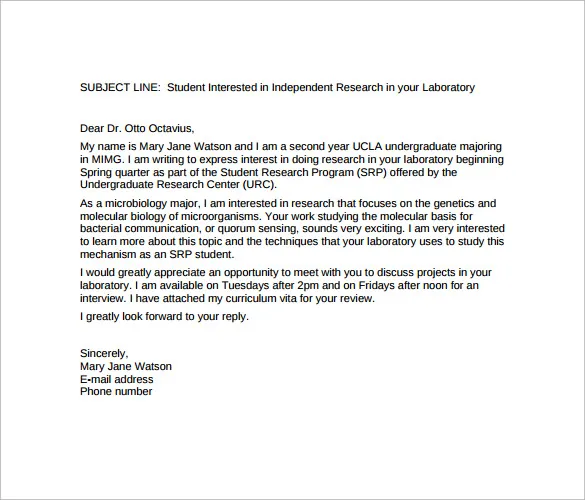
What is a Cover Letter Email
A cover letter email serves as your digital introduction to a potential employer. It’s the first impression you make, a concise summary of why you’re the perfect fit for the job, and a pathway to your resume and cover letter. Unlike a printed cover letter, the email itself is the primary means of communication. This is where you showcase your personality, communication skills, and enthusiasm for the position. A well-crafted email, therefore, is an essential part of your job application strategy. It’s your opportunity to grab the hiring manager’s attention and compel them to read your attached resume and cover letter.
Why is a Cover Letter Email Important
The cover letter email is more than just a formality; it’s a crucial tool in the job application process. It allows you to personalize your application, demonstrating to the employer that you’ve taken the time to understand their needs and that you are genuinely interested in the role. It’s also an excellent opportunity to highlight key skills and experiences that directly align with the job description. A strong email can significantly increase your chances of getting noticed, especially in a competitive job market. A well-written email indicates professionalism, attention to detail, and a proactive approach, all qualities that employers value.
Crafting the Perfect Subject Line

The subject line is the first thing a recruiter sees. Make it clear, concise, and compelling. Use the job title and your name. For example, ‘Software Engineer Application - John Doe’ is more effective than a generic ‘Job Application’. Consider including the job reference number, if provided. It’s crucial that the subject line immediately communicates the purpose of the email. This helps the recruiter quickly identify the email and understand what it’s about. A compelling subject line increases the chances of your email being opened and read, giving you a head start in making a positive first impression. Avoid vague or overly casual subject lines.
Keep it Concise and Professional
Your email should be easy to read and get straight to the point. Keep your message brief, ideally within four to five short paragraphs. Start with a professional greeting, such as ‘Dear Mr./Ms./Mx. [Last Name]’ or ‘Dear Hiring Manager’. In the body of the email, briefly introduce yourself, state the position you’re applying for, and mention where you saw the job posting. Focus on the most relevant skills and experiences, and explain why you are a good fit for the role. The goal is to provide a compelling overview of your qualifications, enticing the reader to review your resume and cover letter. A well-structured email respects the reader’s time.
Highlight Your Key Skills and Experience
In the body of your email, highlight the skills and experiences that align with the job description. Use keywords from the job posting to demonstrate you have the required qualifications. Provide specific examples of how you’ve used your skills to achieve results. For example, instead of saying ‘I have strong communication skills,’ state ‘In my previous role, I successfully led a team of 10, improving project delivery by 15% through effective communication and collaboration.’ Quantify your achievements whenever possible to add more impact. Your goal is to prove that you possess the necessary skills, and you’re the best fit for the job.
Tailoring Your Cover Letter Email

Avoid sending the same generic email for every job application. Tailor your email to each specific role and company. This means customizing your content to reflect the requirements of the job and the values of the company. Research the company’s culture, mission, and values. Demonstrate that you understand the organization’s needs and that you have the skills to contribute to their success. Mentioning something specific about the company shows you’ve taken the initiative to learn more about them and that you’re genuinely interested. Customization demonstrates your commitment to the role.
Research the Company and the Role
Before writing your cover letter email, research the company and the specific role you’re applying for. Visit the company’s website, read articles about them, and check their social media profiles. This will give you insights into their values, culture, and recent projects. Understanding the role involves reviewing the job description thoroughly, noting the key responsibilities, and identifying the required skills. Use this information to tailor your email and demonstrate how your skills and experience align with the company’s needs and the job requirements. This targeted approach shows that you’re serious about the opportunity.
Address the Hiring Manager Directly
Whenever possible, address the hiring manager by name. This shows that you’ve taken the initiative to find out who is responsible for the hiring process. If you can’t find the hiring manager’s name, address the email to the hiring team or, as a last resort, use ‘Dear Hiring Manager.’ Using the hiring manager’s name adds a personal touch and demonstrates that you’re paying attention to detail. It also sets you apart from candidates who may use a generic salutation.
Show Enthusiasm and Personality

Let your enthusiasm for the role and the company shine through. Express your genuine interest in the position and explain why you’re excited about the opportunity. However, maintain a professional tone. Avoid overly casual language or slang. Your goal is to show that you’re a good fit not just in terms of skills but also in terms of personality and work ethic. Use positive language and a confident tone. Your enthusiasm should be clear but contained.
Proofread Carefully and Check for Errors
Before sending your email, proofread it carefully for any grammatical errors, typos, or inconsistencies. A single mistake can create a negative impression and undermine your credibility. Use a spell-checker and grammar-checker to identify and correct any errors. Read the email aloud to catch any awkward phrasing or sentence structure. It is advisable to have someone else read it over to ensure that it is error-free. Attention to detail is a key professional quality.
Include a Clear Call to Action
End your email with a clear call to action. Let the hiring manager know what you want them to do next. This could be a request to review your resume and cover letter, an invitation to schedule an interview, or an expression of your availability to answer any questions. Make it easy for the hiring manager to take the next step. Thank the hiring manager for their time and consideration. A clear call to action ensures that the email ends with a purpose.
Formatting Your Cover Letter Email

Your email should be easy to read on any device. Use a clear and professional font, such as Arial or Calibri. Avoid excessive formatting, such as bolding or underlining, unless necessary. Use short paragraphs and plenty of white space to make the email visually appealing. Consider using bullet points to highlight key skills or accomplishments. The email’s formatting should prioritize readability. Make it simple and direct. Ensure your email looks clean and professional on both desktop and mobile devices.
Use a Professional Email Signature
Include a professional email signature with your full name, phone number, and LinkedIn profile URL. This provides the hiring manager with multiple ways to contact you and gives them easy access to your professional profile. Avoid using a casual or unprofessional email address. If possible, use a professional email address that includes your name. This is another way to make sure you give a positive first impression and facilitate follow-up communication.
Attach Your Cover Letter and Resume
Always attach your cover letter and resume to your email. Ensure that the files are in a professional format, such as PDF, to maintain the formatting across different devices. Name your files clearly using your name and the document type, such as ‘John_Doe_Resume.pdf’ and ‘John_Doe_Cover_Letter.pdf’. Double-check that you’ve attached the correct versions of your documents before sending the email. Missing attachments or incorrectly named files can reflect poorly on your application.
Follow Up After Sending

After sending your cover letter email, it’s appropriate to follow up, generally within a week or two. Send a brief email, reiterating your interest in the position and inquiring about the status of your application. Keep the follow-up email concise and professional. The goal is to show your continued interest without being overly persistent. If you don’t hear back after a second follow-up, you may consider it time to move on, unless the job timeline states otherwise.
Common Mistakes to Avoid
Generic and Uninspired Content
Avoid sending a generic email that could be sent to any employer. Personalize your message. Tailor your content to the specific role and company to show your genuine interest. Highlight skills and experiences relevant to the job description. Show that you’ve done your research and understand their needs.
Typos and Grammatical Errors

Carelessly made errors indicate a lack of attention to detail. Always proofread your email carefully before sending it. Run a spell-check and grammar-check to catch any mistakes. Ask someone else to read your email for a second opinion. A polished email will make you look more professional.
Sending Without Customization
Avoid sending a generic email to multiple employers. Tailor each email to the specific role and company. This shows you’ve taken the time to understand the organization’s needs and demonstrates your genuine interest. Customize your email to reflect the job description and the company’s values. This increases your chances of getting noticed.
Ignoring the Instructions
Carefully read and follow any instructions provided in the job posting or application process. If the job description requests specific information, be sure to include it. If there are any instructions regarding formatting or file naming, follow them precisely. Ignoring instructions can lead to your application being overlooked.
Conclusion
Crafting the perfect cover letter email is a crucial step in the job application process. By following these guidelines, you can create an email that showcases your skills, experience, and enthusiasm. Remember to tailor your email to each role, proofread carefully, and always include a clear call to action. A well-written cover letter email can significantly increase your chances of landing an interview and ultimately securing your dream job. Good luck!